


Key takeaways:
- AI bot traffic isn't spam to be filtered out—it's often a high-intent signal that a real person just prompted an AI about your brand or category. Tracked properly, it's one of the most valuable audiences you have.
- AI bot traffic and AI referral traffic are two different things, and they answer two different questions. Bot visits show you what AI is consuming on your site. Referral traffic shows you who’s actually converting from AI responses.
- Standard analytics tools weren't built to handle AI agents. Purpose-built detection from a platform like Scrunch is the most reliable way to separate signal from noise—and act on it fast.
You’ve got questions, we’ve got answers.
We dug through our call transcripts, scanned our support bot logs, and polled our sales, support, and customer success teams.
These are some of the AI bot traffic questions that pop up again and again—and the answers you’re looking for.
How do I detect AI bot traffic visiting my site?
Short answer: AI bots identify themselves through their user agent strings, so you can technically catch them in your server logs. But manual detection breaks down fast at scale—tools like Scrunch automate the whole process.
Longer answer: Most AI platforms send out crawlers with identifiable user agent strings—GPTBot for OpenAI, ClaudeBot for Anthropic, PerplexityBot for Perplexity, and so on.
In theory, you can spot them by parsing server logs or filtering your analytics tool by user agent.
In practice, this approach has problems.
Piecing the picture together across hundreds (or thousands) of pages and dozens of bot types is exactly the kind of work that gets deprioritized when other things pile up.
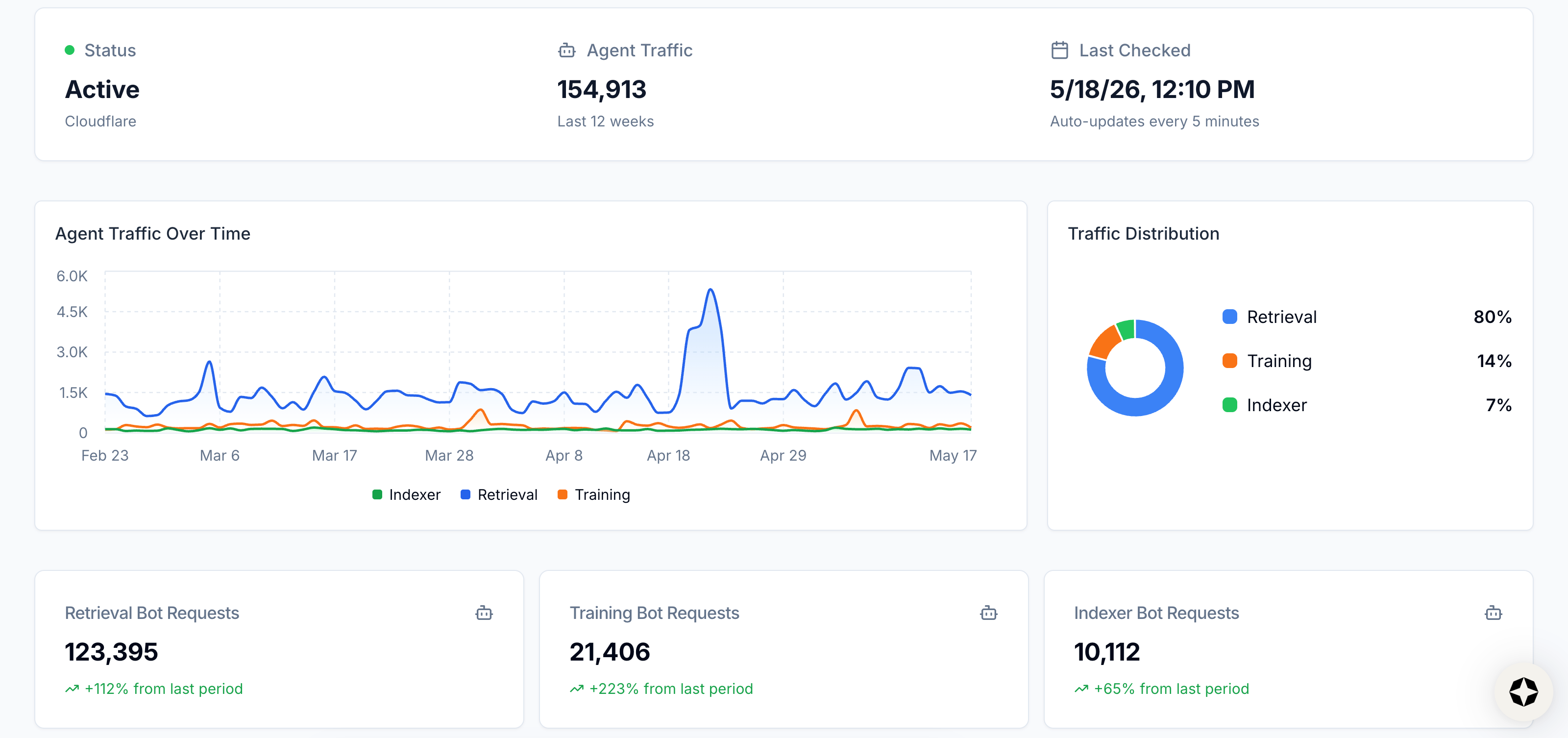
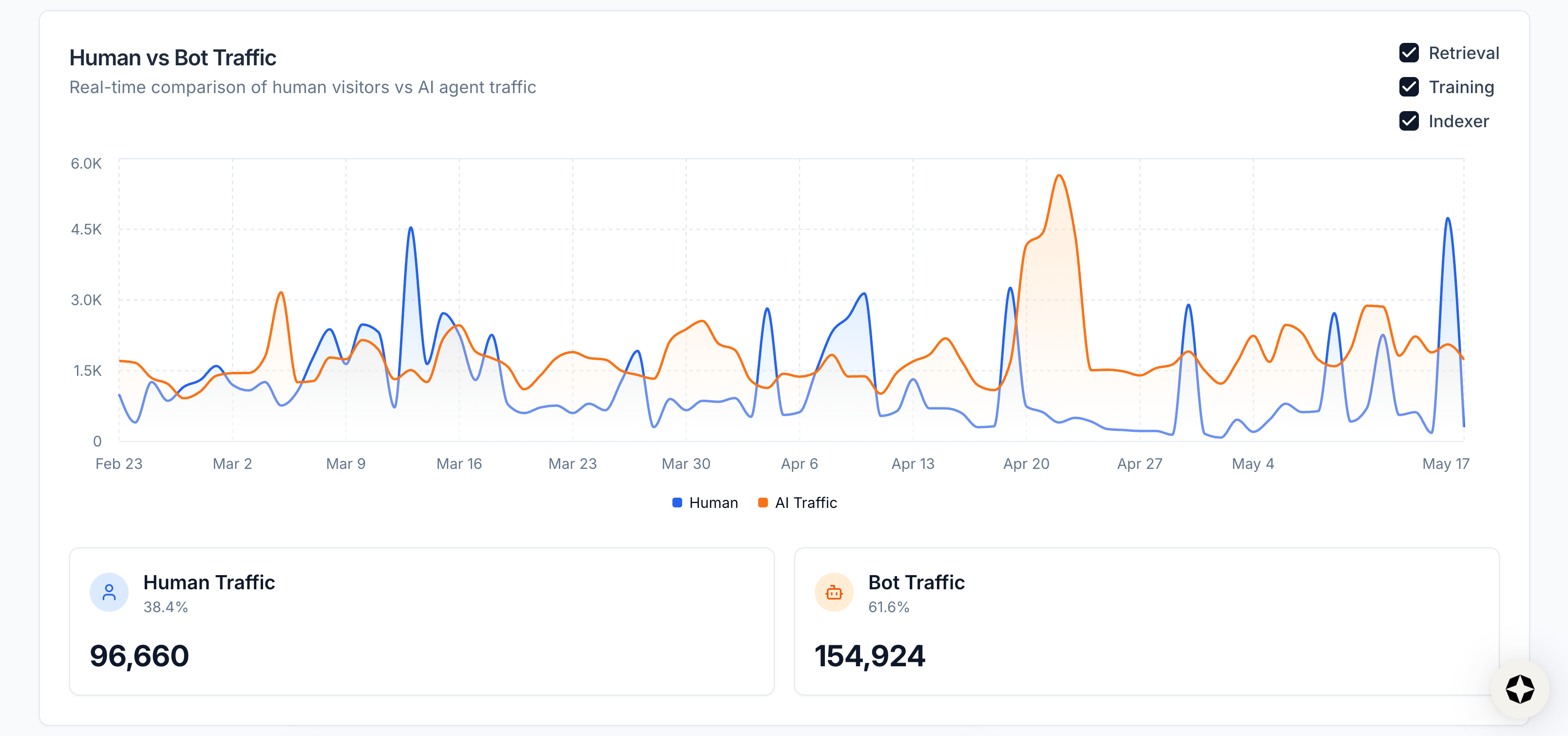
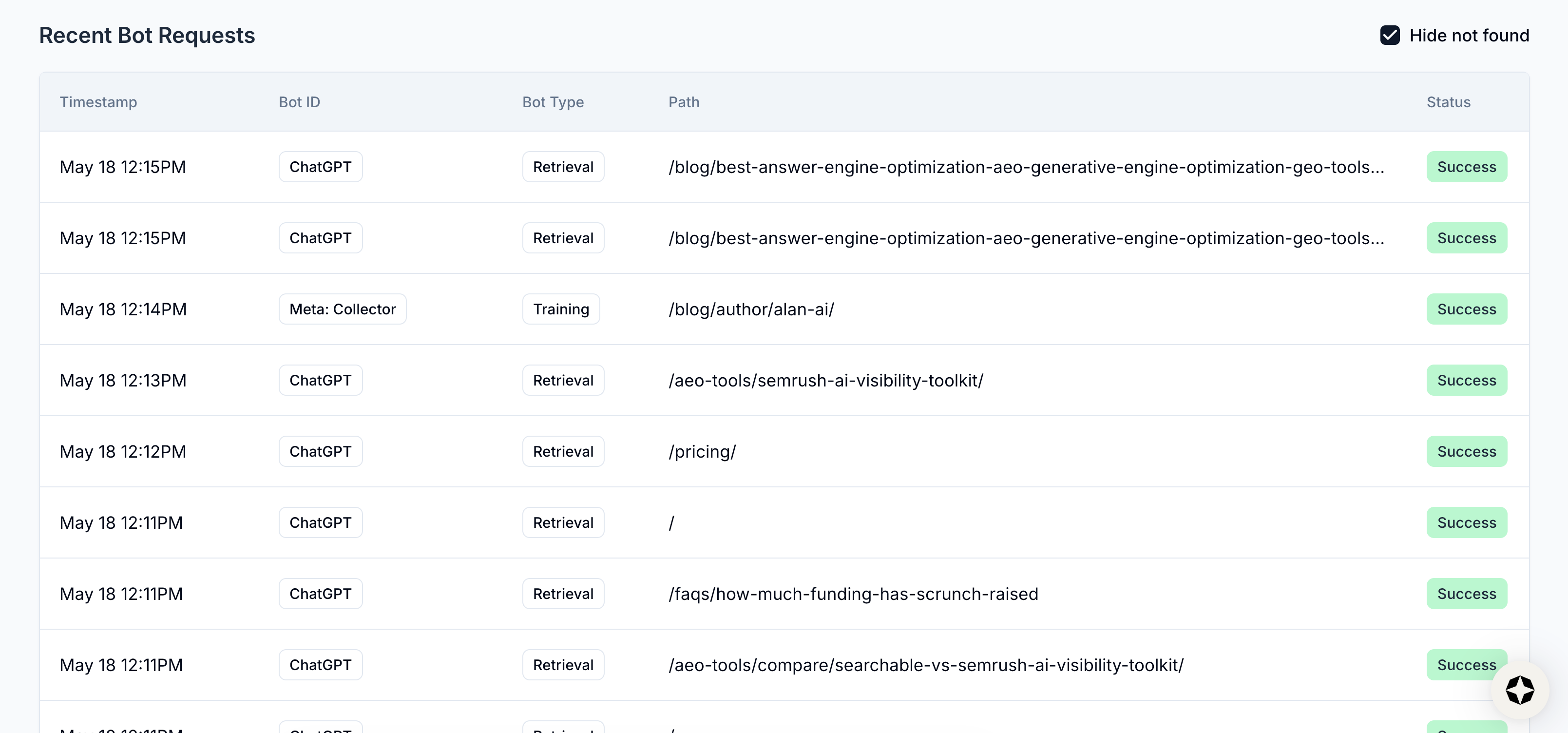
Scrunch’s Agent Traffic feature handles this for you. It identifies and verifies AI bot visits in real time, then surfaces trends, bot type distribution, human versus bot traffic over time, top bots, top pages visited, and recent bot requests all in a single view.
The result is a clean read on AI bot activity without the spreadsheet maintenance.
How do I see which AI platforms are sending me the most bot traffic?
Short answer: Analyze bot traffic manually in your server logs or filter bot traffic by platform using a technology like Scrunch.
Longer answer: Different AI platforms use different bots, and they don't all behave the same way.
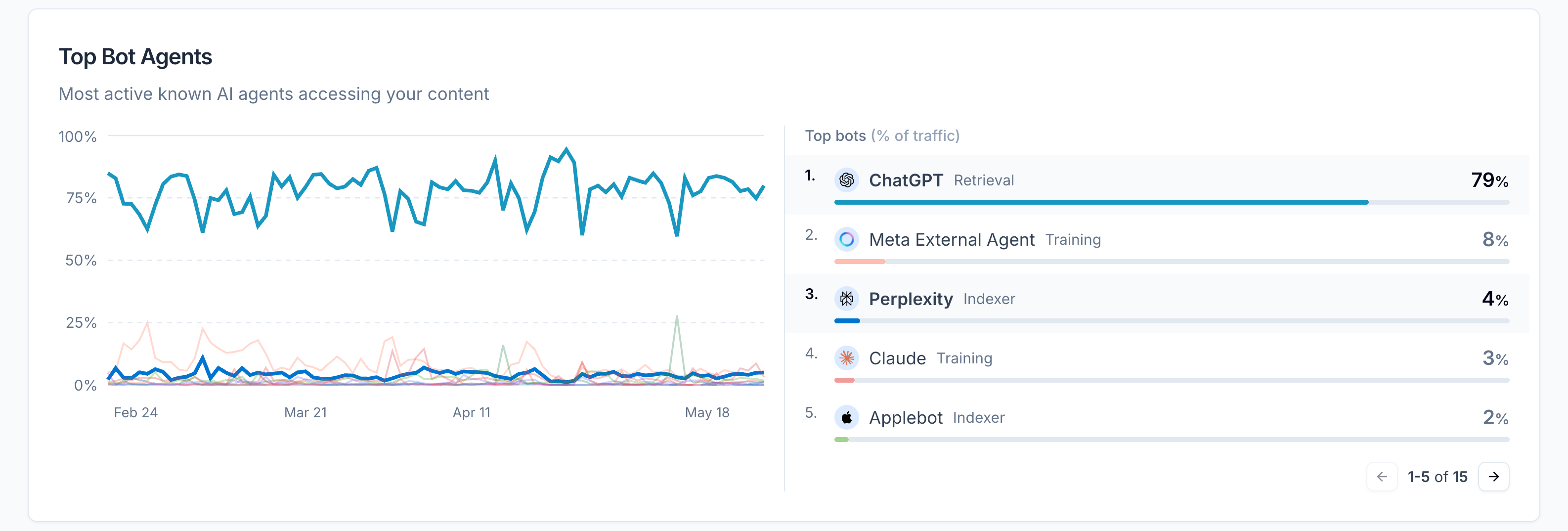
ChatGPT's bot might hit your site dozens of times a day while Perplexity is barely visible—or vice versa. Knowing the breakdown helps you understand where your content is actually being consumed.
Doing this manually means parsing server logs, mapping user agent strings to platforms, and aggregating volume over time. Doable, but tedious and time-consuming.
Scrunch automates the whole thing. Agent Traffic breaks down bot visits by platform—OpenAI, Perplexity, Google, etc.—so you can see at a glance where your AI footprint is strongest and where you might be invisible.
That platform-level view becomes especially useful when you start asking strategic questions.
If a particular AI bot is heavily visiting your site but you're not showing up in responses, you've got a content problem, not a crawl problem.
And if a platform isn't crawling you at all, that's a different issue requiring a different fix.
How can I see which pages are most visited by AI bots?
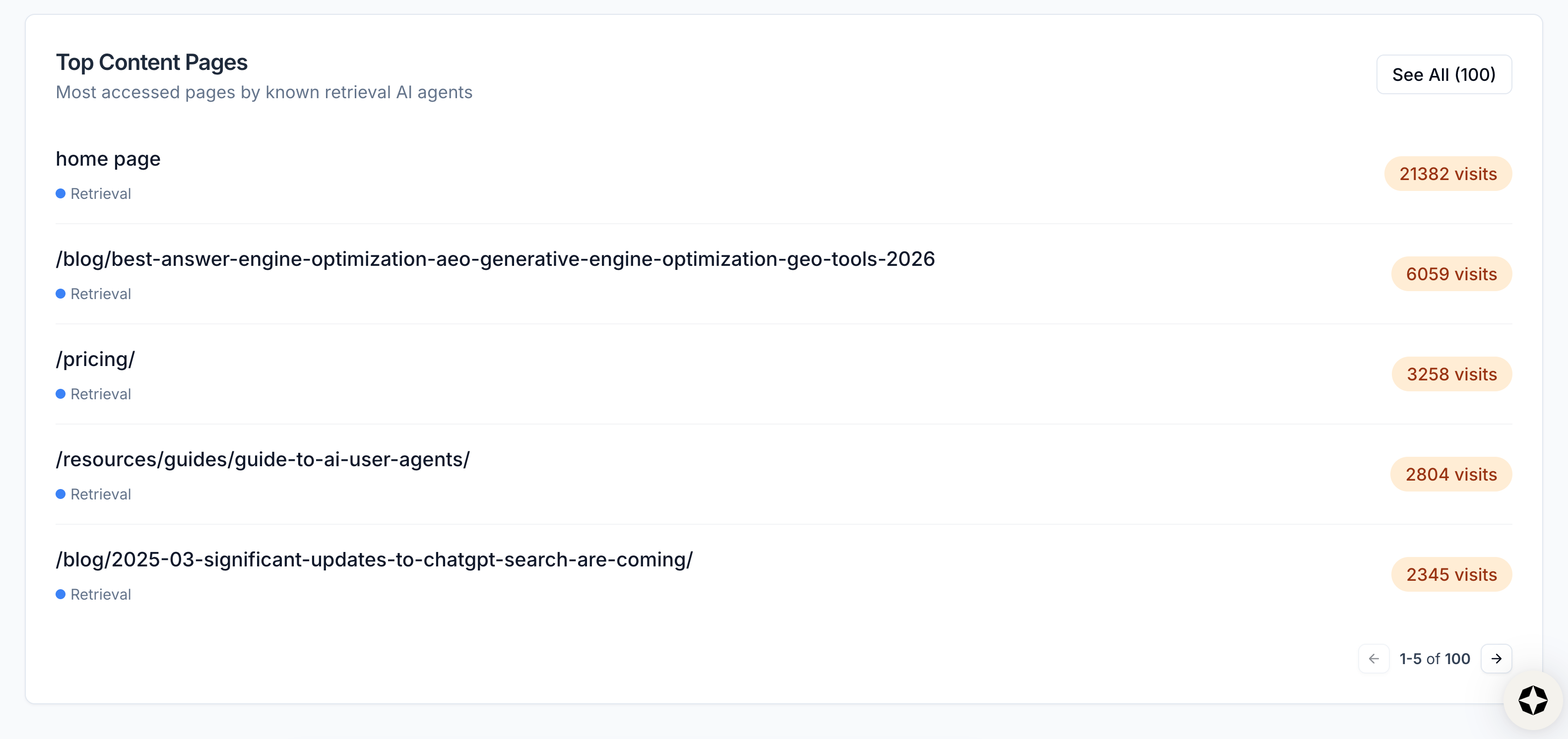
Short answer: You can tally up page visits manually using your server logs or let a dedicated platform like Scrunch give you a page-level breakdown of traffic across your entire site, ranked by volume.
Longer answer: Bot visits aren't evenly distributed. The pages AI user agents gravitate toward tell you what users are actually asking about and which pages on your site bots find most pertinent.
This is useful for a few reasons.
First, it tells you what content AI considers relevant for your category. If a particular product page is getting hammered while another sits idle, that's a signal worth investigating.
Second, it helps you prioritize optimization work. The pages AI agents visit most often are the ones where small content or technical improvements have the biggest payoff potential.
Third, it reveals gaps. Pages you'd expect to get traffic but don't might have access issues, content problems, or structural barriers keeping AI out.
Scrunch surfaces all of this for you automatically so you can quickly see where AI attention is concentrated and where the obvious blind spots are.
How should AI traffic be segmented—by model, bot type, or something else?
Short answer: It’s smart to segment by both platform model and bot purpose using a tool like Scrunch. Different segments answer different questions about how AI is interacting with your website.
Longer answer: The best approach to segmenting AI traffic ultimately depends on what you're trying to learn.
That said, here are a few useful segmentation lenses:
- By platform: Which AI platforms are crawling you most, and how does activity differ between them? Useful for understanding where your content is being consumed and where you might need to invest more attention.
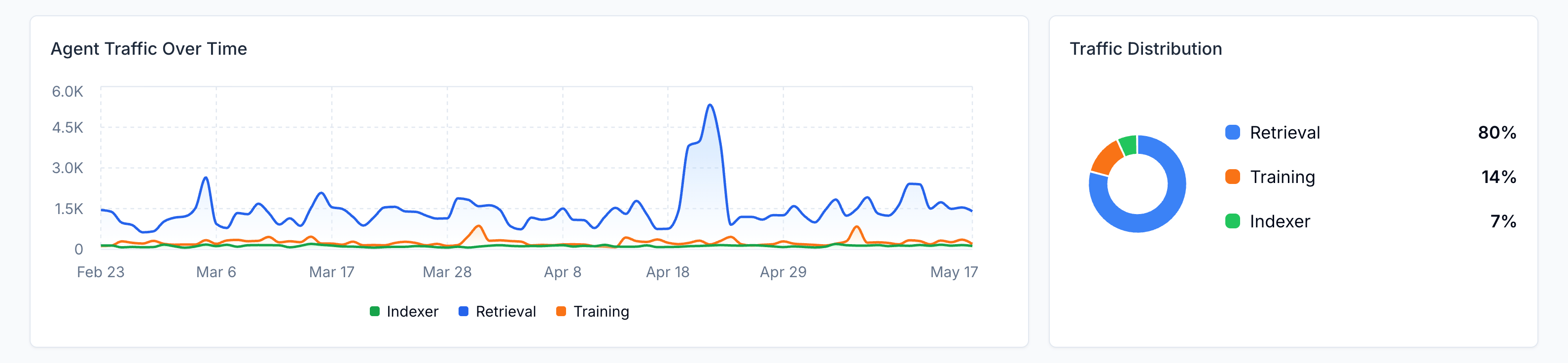
- By bot purpose: Some AI bots are training LLMs, some are indexing content, and some are retrieving content in real time. Real-time retrieval bots are the ones tied directly to a human prompt happening right now—the most actionable signal.
- By page: Which pages are getting the most attention, and from which bots? This tells you which content on your site is pulling its weight—and which pieces may need a boost.
- By time: How is AI activity changing over days, weeks, or months? Spikes can correlate with model updates, news cycles, or content changes you've made.
Scrunch supports all of these segmentations natively. You can view AI bot traffic data by platform, bot type, page, and time range without exporting to a spreadsheet.
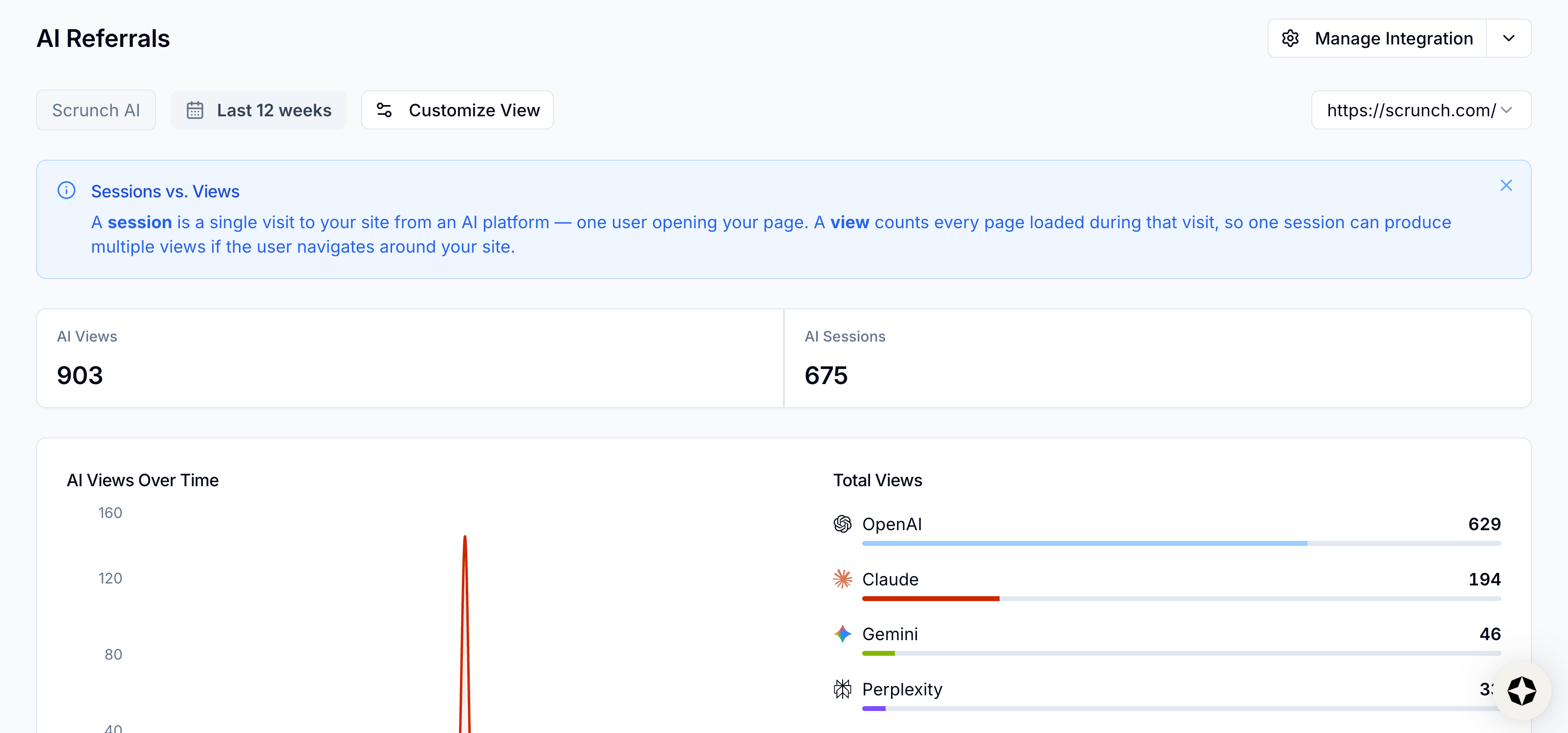
How do I monitor whether AI search is sending traffic to my site?
Short answer: You can use tools like Google Analytics (GA4) or HubSpot to try to track specific session sources tied to user agent strings or let a technology like Scrunch surface the data for you.
Longer answer: AI referral traffic—aka real humans clicking through from an AI response to your website—is harder to track than bot traffic because referrer headers from AI platforms aren't always consistent.
GA4 and similar tools capture some of this, but the data can be incomplete or misclassified.
Visits from ChatGPT, for instance, may land in your "direct" or "other" buckets with no clear signal that they came from an AI response.
Scrunch automatically plugs up the gaps. Its AI Referrals feature identifies traffic coming from AI platforms even when standard analytics tools miss it and lets you customize data display by views, sessions, transactions, and revenue across whatever time range you want.
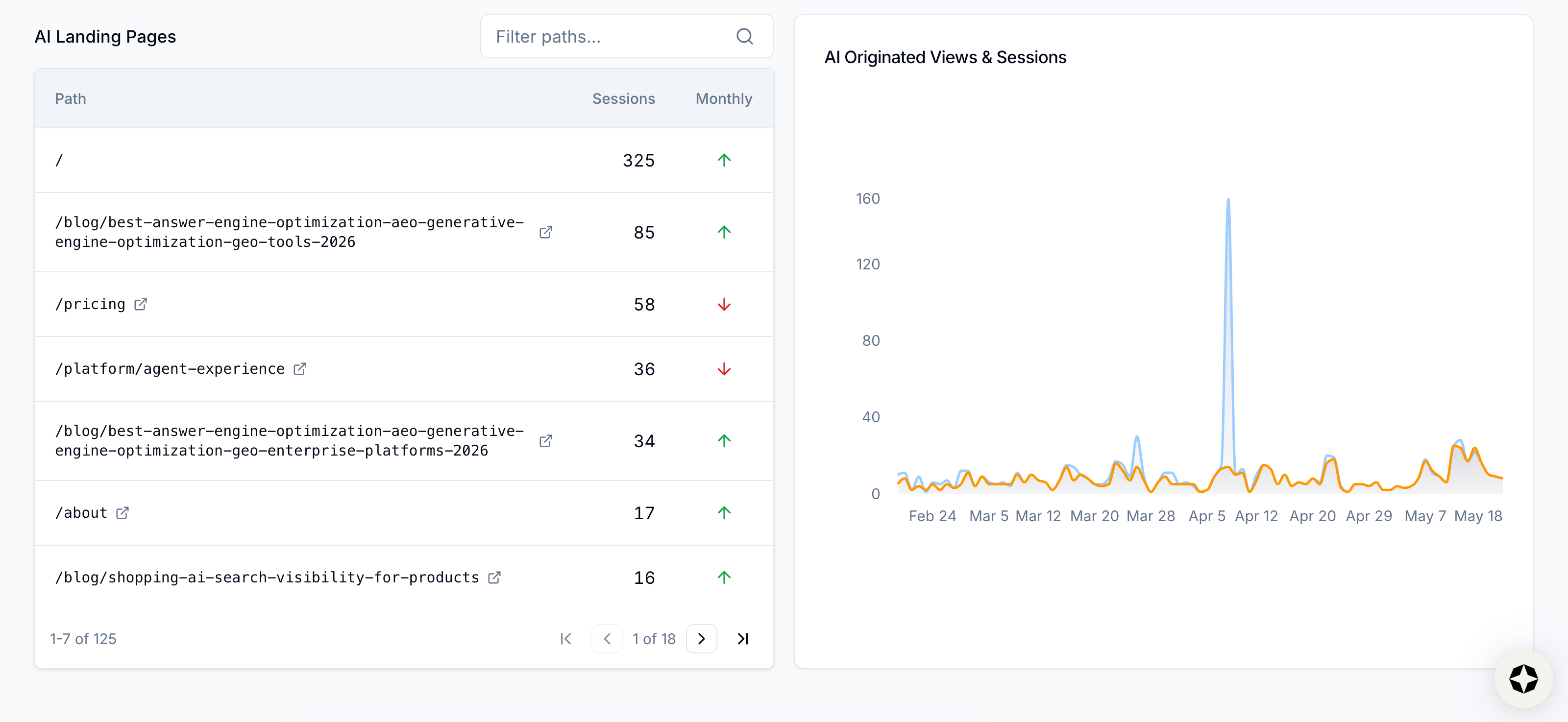
You can also view your data based on different filter paths—helpful for zeroing in on which pages are drawing the most human traffic from AI.
What’s the best way to monitor changes in AI referral traffic over time?
Short answer: Lock in a consistent measurement window and a consistent set of KPIs, then watch how the numbers move week over week and month over month. A dedicated platform like Scrunch is built for this kind of longitudinal view.
Longer answer: AI-driven referral traffic is likely to be a much smaller slice of the pie compared to traditional organic search traffic.
With that in mind, it’s highly valuable, so it’s worth measuring how it rises or falls over time.
AI Referrals in Scrunch is built around this. You can set custom time ranges and compare them: last 30 days against the 30 before, this quarter against last, the month after an optimization push against the month before it.
Real trends show up over weeks, not days. Daily numbers tend to be too small to mean much on their own.
Your filters for views, sessions, transactions, and revenue stay locked across windows, so you're comparing the same thing to the same thing.
That's what makes the feedback loop work. When you ship a content change, land a third-party citation, or fix a technical issue, you can actually see whether referral traffic from the relevant AI platform climbed in the weeks that followed—or didn't.
Over time, the patterns add up. You learn which moves move the needle, which don't, and where to spend your next effort.

How should AI traffic be measured differently from traditional organic traffic?
Short answer: Since AI traffic is mostly bots instead of humans, the frame of reference is different from traditional SEO. Meaningful KPIs include volume of bot visits, top pages by bot visits, and downstream referral traffic, all of which can be measured with a tool like Scrunch.
Longer answer: Traditional organic traffic measurement is built around humans clicking links from a search results page. Sessions, bounce rate, time on page, conversions—all of it assumes a human at the other end.
AI traffic doesn't work that way.
The bulk of AI-sourced activity on your site is bot activity, not human activity. AI agents visit pages to gather information for an answer that's served back to a user inside the AI interface—often without any click-through at all.
That changes what matters.
The volume of AI bot visits tells you how much AI attention your site is getting. Top pages by bot traffic tells you what AI considers relevant (and what people are asking about). And AI referral traffic, when it does happen, tends to convert at a higher rate than traditional organic because the user has already done most of their research before clicking.
Tracking AI traffic requires a mindset shift. AI search is mostly a zero-click channel where bot activity is the leading indicator. Treat it that way and your measurement strategy gets a lot clearer.
How do teams typically separate human traffic from AI bot activity?
Short answer: Bot traffic has historically been treated as noise to filter out and forget. But with AI agents now driving a meaningful (and growing) share of website visits, that habit is starting to cost teams real intelligence. Smart ones use technologies like Scrunch to filter their views of AI versus human activity.
Longer answer: For most of the internet's history, the standard playbook was simple: Identify bots, exclude them from analytics, and analyze only the human traffic that remained. Bots were spam, scrapers, or search crawlers indexing pages for ranking.
None of it told you much about your buyers, so none of it was worth the effort to analyze.
That logic doesn't hold anymore.
AI bot traffic isn't generic crawl activity. When ChatGPT, Perplexity, or Gemini sends a bot to your site, it's often because a real person just asked the AI about your brand, your product, or your category.
The bot is gathering information for an answer that's about to be served back to a buyer. That's not noise. That's a high-intent signal.
The teams getting ahead of this are:
- Filtering: Identifying known AI user agents and analyzing them as their own audience.
- Segmenting: Identifying the type of bot to understand if it’s training, indexing, or retrieving.
Scrunch makes this easy. Agent Traffic identifies and verifies AI bots in real time, presents them as a separate data stream from your human analytics, and surfaces the volume, platform, bot type, and page context you need to actually use the data.
No list maintenance or log parsing necessary.
Our take: The teams that move first on this will have a clearer read on AI-driven demand than the teams that keep treating bot traffic as something to ignore.
What AI platforms does Scrunch currently track bot traffic for?
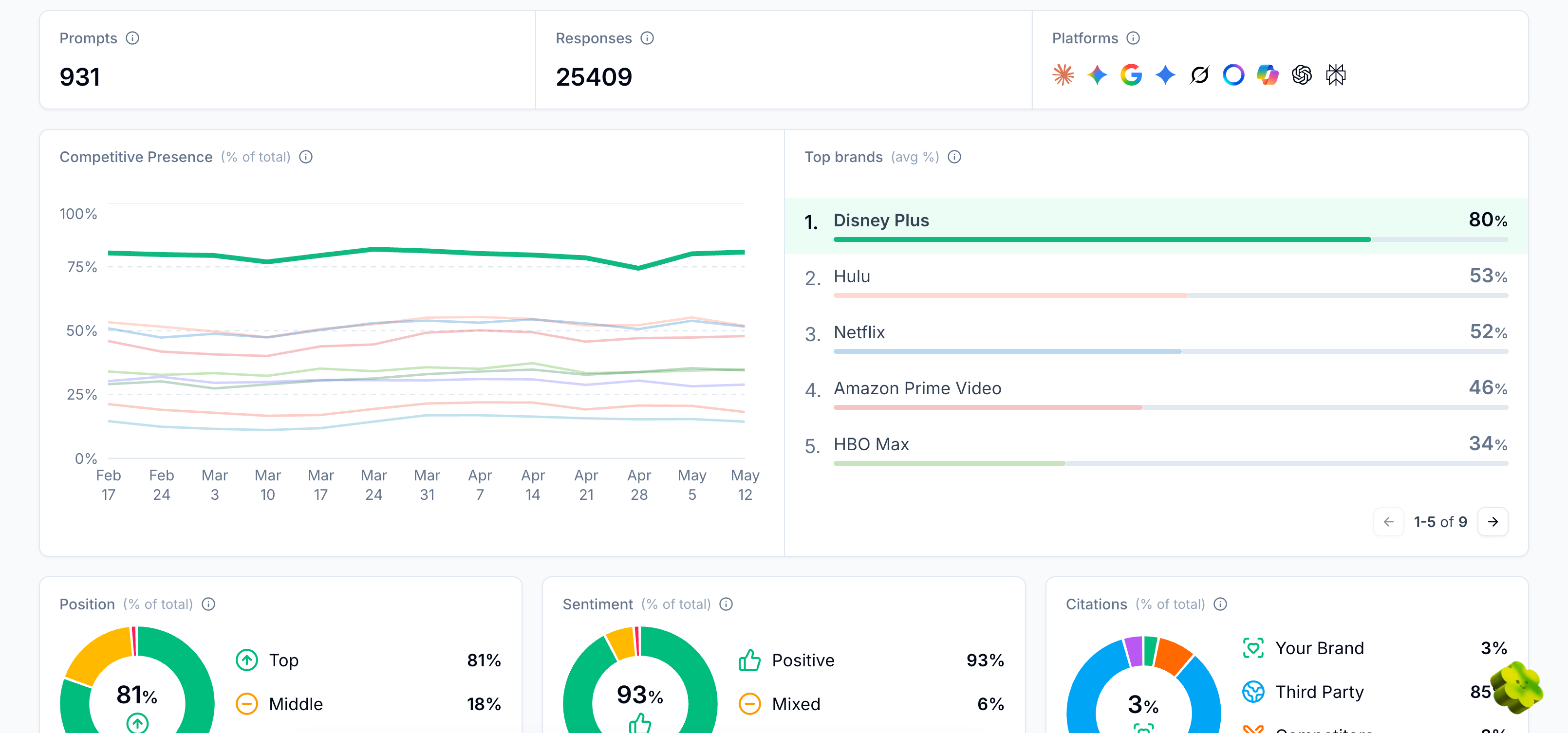
Short answer: Scrunch tracks bot traffic from all major AI platforms, including ChatGPT, Perplexity, Gemini, Claude, Google AI Mode, Google AI Overviews, Grok, Copilot, and Meta. New platforms are added based on consumer usage and customer demand.
Longer answer: AI bot detection is a moving target. Keeping pace with new launches and models is its own job.
Scrunch maintains active coverage of bots from the major AI platforms and updates detection logic as platforms change theirs.
That ongoing maintenance is one of the main reasons customers use Scrunch instead of trying to build and maintain their own bot detection program.
It's not that the basic identification is impossible. It's that staying current—and doing it at scale—can feel that way.
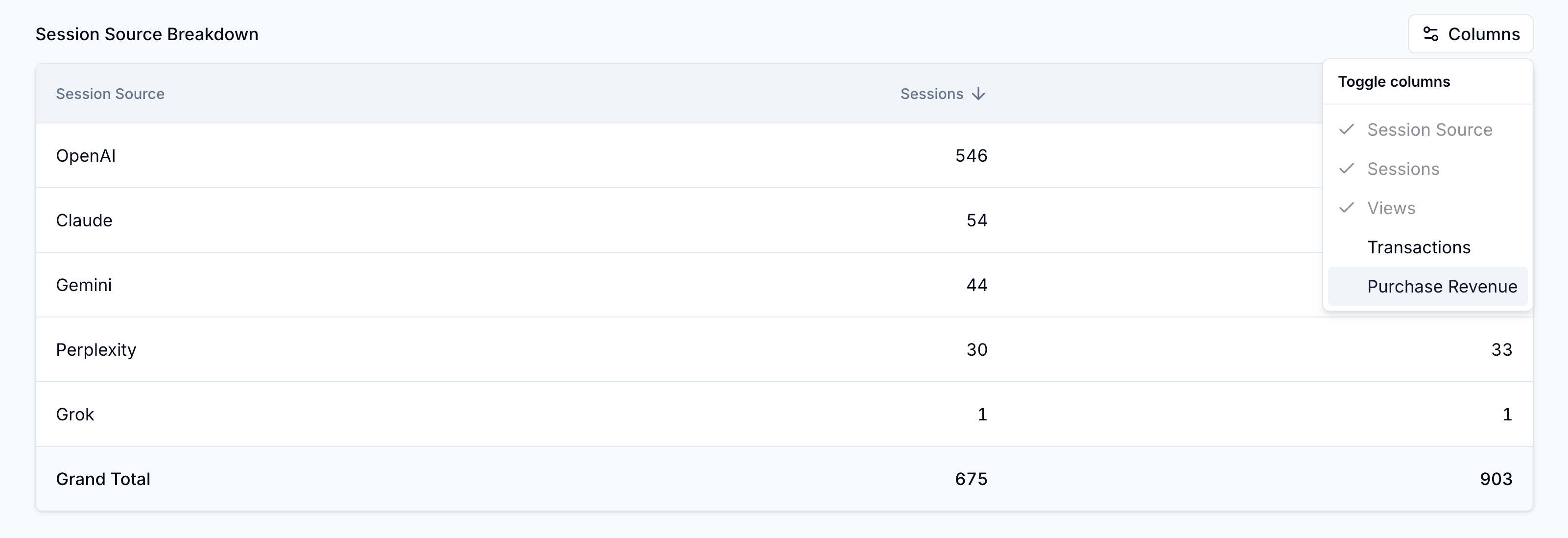
How does Scrunch detect AI bot traffic compared to GA4 or server logs?
Short answer: GA4 wasn't built for AI bots, and server logs require heavy manual analysis. Scrunch is purpose-built for AI traffic detection and presents the data in an actionable format out of the box.
Longer answer: GA4 is built for human traffic, which means a lot of AI activity simply may not show up. Even when you can capture it, the dashboards aren't designed to surface the metrics that matter for AI traffic—volume by bot, page-level activity, platform breakdowns, and so on.
Server logs have the raw data, but turning that data into something useful requires parsing, IP verification, mapping user agents to platforms, aggregating across thousands of requests, and visualizing the result. It's possible. It's also a major project.
Scrunch is built for AI bots from the ground up. It connects directly to your CDN or hosting provider (Cloudflare, Akamai, Vercel, WordPress, etc.) to monitor AI bots crawling your site in real time, which captures bot visits that often don’t show up in GA4 because they don’t trigger pageviews.
It identifies and verifies visits, classifies them by platform and purpose, attributes them to specific pages, and presents the data in a dashboard organized around the questions teams actually need to answer.
The trade-off most teams face is build versus buy. Building meaningful AI traffic analytics in-house is doable for technically deep teams, but the maintenance burden adds up fast.
Scrunch is the off-the-shelf alternative.
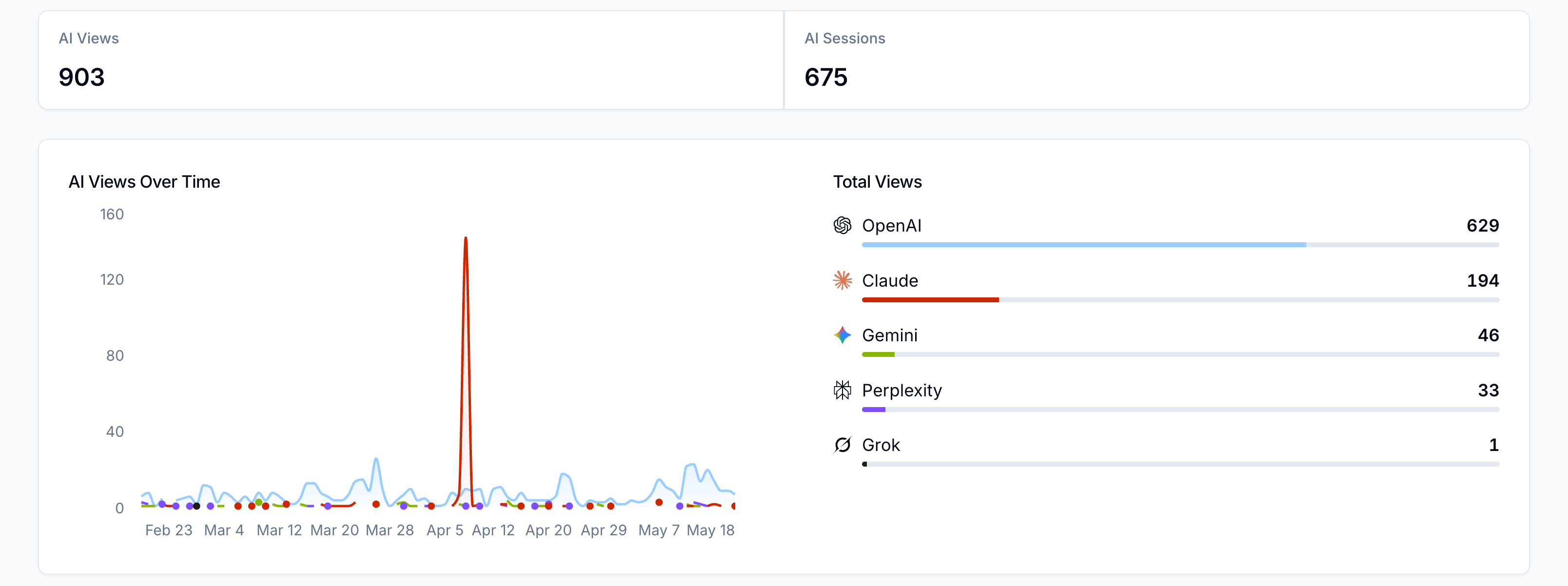
Can Scrunch distinguish between AI crawler traffic and AI-driven referral traffic?
Short answer: Yes—they're tracked as two separate data streams (one captured from a CDN or hosting provider, the other captured from website analytics) in Scrunch because they answer two different questions about your AI presence.
Longer answer: Crawler traffic is AI bots visiting your site to gather information for answers. Referral traffic is humans clicking through from an AI response to your site. Both matter, but they tell you different things.
AI bot traffic is your upstream signal. High bot activity on a page means AI is paying attention because the page is relevant to user queries. Tracked over time, crawler activity gives you an early read on whether your content is becoming more or less relevant in AI's eyes.
Referral traffic is your downstream signal. It's what happens when AI cites you, a user reads the response, decides they want to learn more, and clicks through. These visitors are rarer than traditional organic traffic but tend to convert at a higher rate because they've already done most of their evaluation work inside the AI interface.
Scrunch tracks both separately. Agent Traffic captures crawler activity—volume, platform, top pages, etc.—from your CDN or hosting provider. AI referral tracking captures the human clicks that result from AI responses from website analytics, like GA4.
Looking at them side by side helps you connect what AI is consuming with what's actually driving business outcomes.
This isn't every question our team fields about AI bot traffic, but it covers a lot of conversational ground.
Got more questions? See our FAQs.
Want to dig deeper? Check out our AI search guide.
Ready to see for yourself? Get in touch or take Scrunch for a test drive.
Get started with Scrunch
Start reaching more customers on AI platforms. Spin up a free account or see Scrunch in action today.


